[Important] Regarding Name Verification and Presentation of the Booking Confirmation Email Upon Boarding
Thank you for choosing the Okinawa Airport Shuttle.
When boarding, we verify your identity by asking for your name. As we may need to cross-check your booking details, please have your "Booking Confirmation Email" ready.
We have observed instances where passengers mistakenly present the "Booking Details Confirmation Screen" (displayed *before* the booking is finalized) instead of the confirmation email. Please note that the booking is not complete on the pre-finalization screen.
Be sure to open the "Booking Confirmation Email," verify that the "Booking Number" is displayed, and present that screen to the staff.
■ Screen to Present
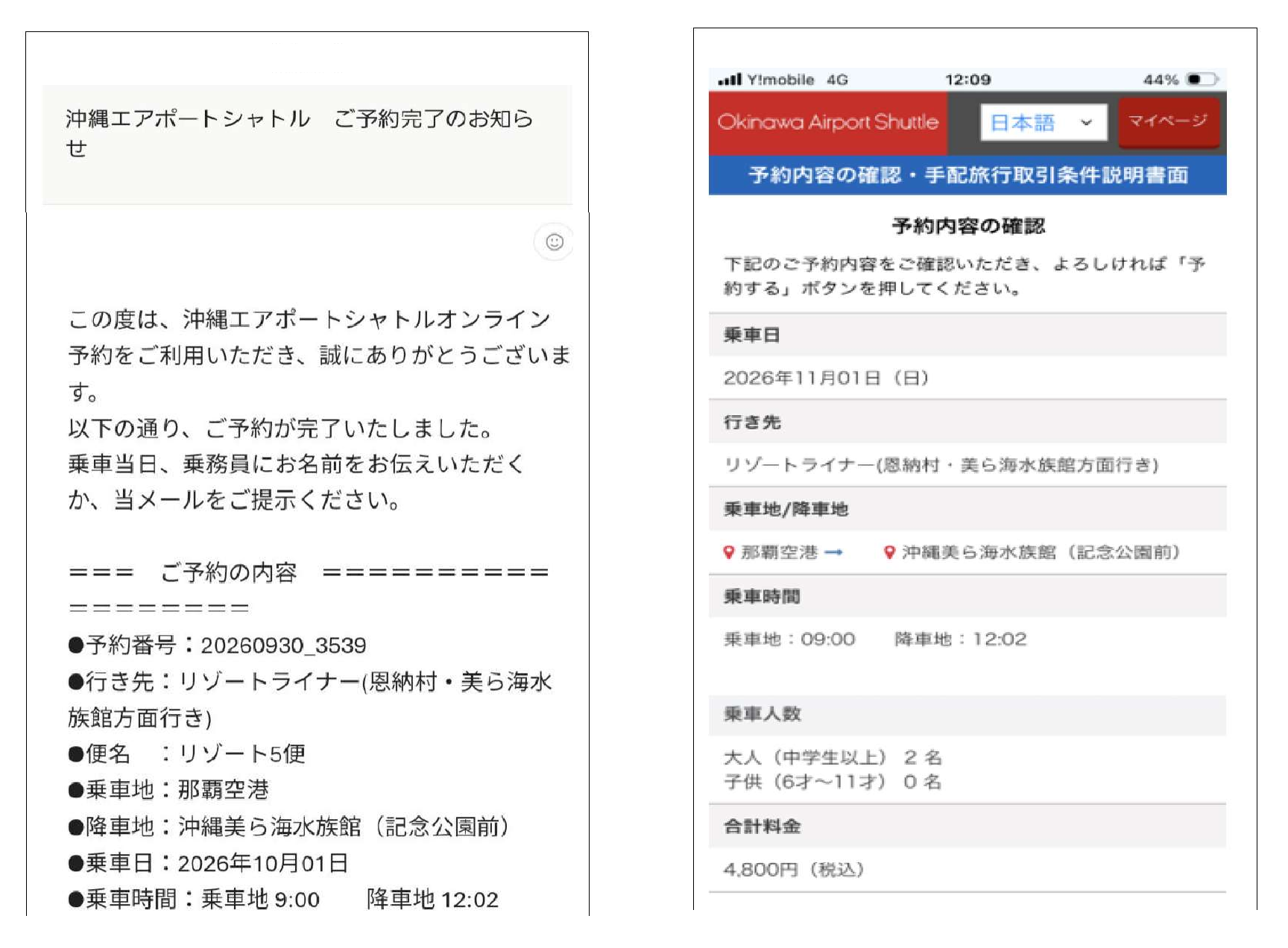
What to present: [Booking Confirmation Email] *See image on the left
・The subject line or body text states "Booking Confirmation" (or similar wording indicating completion).
・Look for the "Booking Number" listed in the email.
Caution: [Booking Details Confirmation Screen] *See image on the right
・If a "Book Now" (or "Make Reservation") button appears on the screen, the booking is not yet complete.
・Please note that we cannot verify your booking using this screen.
To ensure smooth operations, we ask for your understanding and cooperation in having your "Booking Confirmation Email" ready to display when boarding.

